
How to use chatgpt for beginners comes down to one thing: asking for the kind of response you actually want, with just enough context that the model can’t guess wrong.
Most first-time users quit because the answers feel generic, too long, or slightly off, and it’s not their fault, ChatGPT will happily fill in blanks you never meant to leave blank.
This guide gives you a practical setup: what to type, what to avoid, and a few reusable prompt patterns you can copy, whether you’re using it for work, school, or everyday life.

What ChatGPT is (and what it is not)
ChatGPT is a language model, it predicts helpful text based on patterns in training data and your input. It can write, summarize, brainstorm, explain, and draft, but it does not “know” things the way a person does.
Two beginner-friendly mental models help:
- Think of it as a fast draft partner, great at first versions and options.
- Not a source of truth, you still verify facts, numbers, quotes, and anything high-stakes.
According to OpenAI user guidance, models can produce incorrect information and should be used with appropriate human review, especially for important decisions.
Getting started: account, tools, and basic settings
If you can open a chat box, you can start. Still, a few setup choices reduce frustration.
Choose where you’ll use it
- Web app: easiest for beginners, you can copy/paste and save chats.
- Mobile app: good for quick questions, voice input, and on-the-go notes.
- Workspace tools: some teams use ChatGPT-style assistants inside company platforms, rules vary by employer.
One setting that matters: privacy habits
Before you paste anything sensitive, treat the chat like a tool that may be stored and reviewed depending on product settings and policy. In many workplaces, you also have company rules about customer data and internal documents.
- Don’t share passwords, private keys, SSNs, medical records, or customer PII.
- When in doubt, anonymize details, replace names with roles, remove identifiers.
The beginner prompt formula that usually works
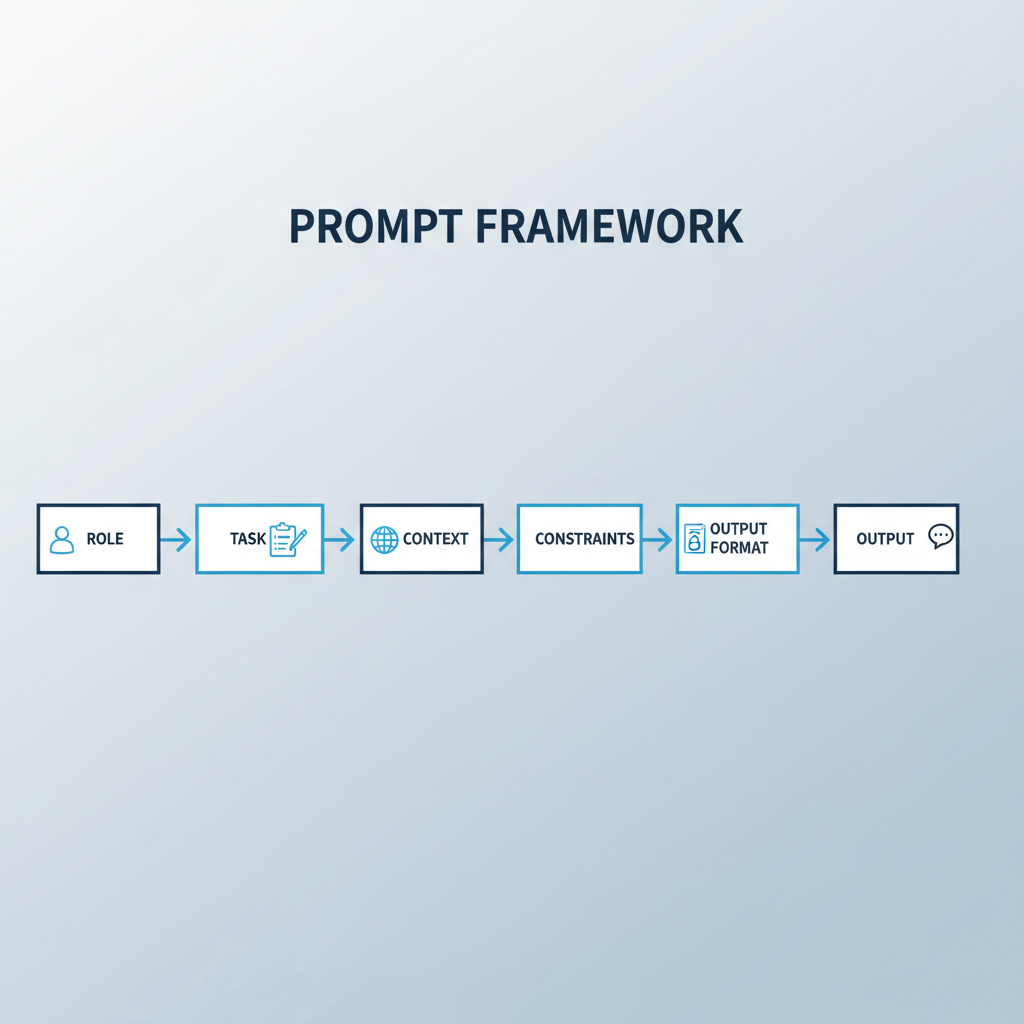
If you’re learning how to use chatgpt for beginners, this is the most useful shortcut: Role + Task + Context + Constraints + Output format.
Here’s a copy-and-use template:
- Role: “Act as a…”
- Task: “Help me…”
- Context: “Here’s what’s going on…”
- Constraints: “Keep it under…”, “Use a friendly tone…”, “No jargon…”
- Output: “Give me bullets / a table / a checklist / a draft email…”
Example prompt (work email): “Act as a customer support lead. Draft a calm, clear reply to a customer upset about a late delivery. Context: order arrived 3 days late, they want a refund. Constraints: 120–160 words, no blame, offer two options. Output: email draft.”
Quick self-check: why your answers feel “meh”
When ChatGPT disappoints beginners, it’s usually one of these issues, not the tool “being bad.”
- Your request is too broad: “Write a marketing plan” becomes a generic template.
- No audience: tone and details drift because the reader is unclear.
- No constraints: it rambles when you never defined length, structure, or scope.
- Missing examples: without a sample, it can’t match your style.
- You needed a follow-up: one prompt rarely nails complex work.
A simple fix is to add one sentence: “Ask me 3 clarifying questions before you answer.” That one line often improves relevance more than rewriting everything.
Practical use cases (with prompts you can steal)
Below are beginner scenarios where ChatGPT tends to be genuinely helpful, because the output can be reviewed quickly.
1) Learn faster (without getting overwhelmed)
- “Explain [topic] like I’m new, then give a 5-question quiz with answers.”
- “Teach me [skill] with a 7-day plan, 20 minutes per day, include practice tasks.”
2) Writing and rewriting
- “Rewrite this for a friendly, confident tone. Keep meaning, shorten by 30%: [paste].”
- “Give me 10 subject lines for this email, no clickbait, under 45 characters: [context].”
3) Work planning and decision support
- “Turn these notes into a meeting agenda with time boxes and outcomes: [notes].”
- “Create a pros/cons table for [choice A] vs [choice B], include risks and unknowns.”
4) Personal admin
- “Draft a polite message to reschedule an appointment, offer two time windows.”
- “Make a grocery list for 5 dinners, budget-friendly, no seafood, include leftovers.”
As you practice how to use chatgpt for beginners, notice the pattern: the best prompts define who it’s for and what ‘good’ looks like.
A simple workflow: from rough idea to usable output
Beginners often expect a perfect first answer. A better workflow is “draft, then tighten.”
- Step 1: Ask for a rough version fast, don’t overthink.
- Step 2: Critique it, tell it what feels wrong.
- Step 3: Request a revision with constraints and a clearer format.
Revision prompt: “This is close, but it’s too long and sounds generic. Keep the structure, cut fluff, add one concrete example per section, and end with a 3-bullet action list.”

When to use tables, lists, and “key points” for better results
If you want clearer answers, ask for structure. ChatGPT is usually better when you force an output format.
Common formats and when to use them
| Format to ask for | Best for | Prompt add-on |
|---|---|---|
| Bullet list | Brainstorming options, steps, checklists | “Use 6–10 bullets, no paragraphs.” |
| Table | Comparisons, plans, schedules, tradeoffs | “Put it in a table with columns: X, Y, Z.” |
| Key takeaways | Summaries you’ll actually remember | “End with 5 key points, each under 12 words.” |
| Template | Repeatable work, emails, SOPs | “Give me a fill-in-the-blank template.” |
Tip: If the model keeps being wordy, tell it: “Write at an 8th-grade reading level, keep sentences short, avoid filler.”
Safety, accuracy, and common beginner mistakes
ChatGPT can be confident and still wrong, which is why your review matters. According to NIST (National Institute of Standards and Technology) guidance on AI risk management, organizations should manage risks such as inaccurate outputs and overreliance through evaluation and human oversight.
- Don’t treat it like a citation: if you need sources, ask for them, then verify independently.
- Watch for hidden assumptions: if you didn’t specify US context, it might answer for another country.
- Be careful with legal, medical, financial guidance: use it to generate questions and talking points, then consult a qualified professional for decisions that carry risk.
- Don’t paste confidential data: rewrite with placeholders when possible.
If you’re using it at work, a safe rule is: if you wouldn’t paste it into a public forum, don’t paste it into a chat tool unless your organization explicitly approves that use.
Key takeaways and what to do next
You don’t need “prompt engineering” to get value, you need clear intent, a bit of context, and a defined output format. Once you internalize the Role-Task-Context-Constraints pattern, how to use chatgpt for beginners stops feeling mysterious and starts feeling like a normal productivity skill.
- Action 1: Save a 5-line prompt template and reuse it for a week.
- Action 2: Add one constraint every time, length, tone, audience, or format.
- Action 3: Verify anything you’d bet money or reputation on.
If you want momentum, pick one task you already do weekly, emails, study notes, meeting agendas, and build a “before/after” prompt for it. That’s how the habit sticks.